



To make an offer on a property with Sheldon Bosley Knight or Andrew Granger & Co, simply follow the steps below. Please ensure you read all the steps carefully before submitting your offer to avoid any delays. Once our team verifies your offer, we will present it to the homeowner. As soon as they reach a decision, we will update you.
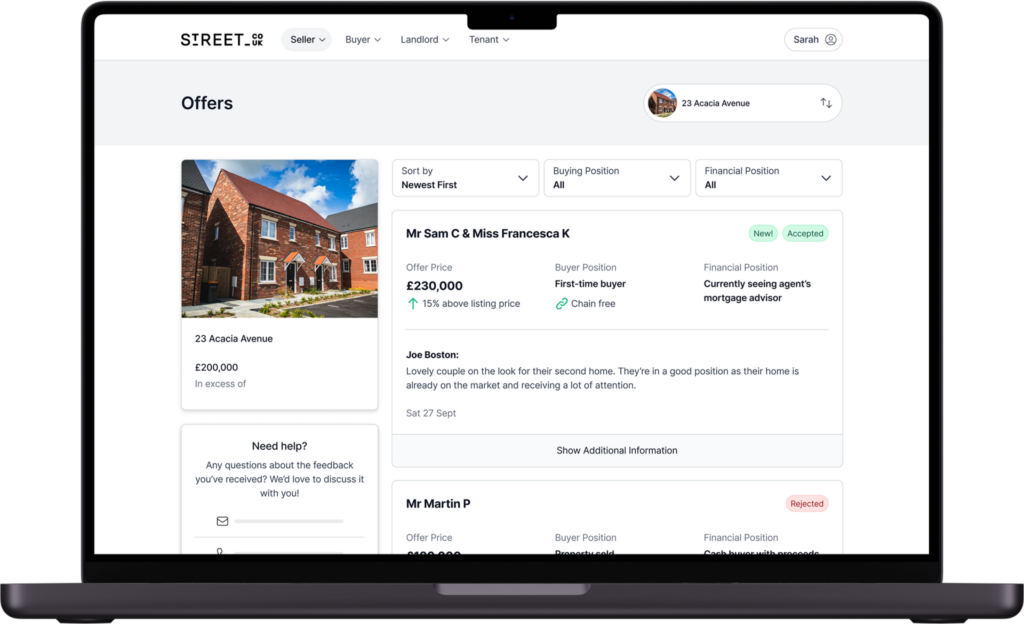
You should, by now, have your own Street portal. The portal is where all official offers are made. If you haven’t set it up yet, simply click the link below to create your portal—but only after you have read all the steps for making an offer. There is also an app available for easy access.
Once you are in the portal, navigate to the property you wish to make an offer on. Double check you are selecting the correct property – especially if you have viewed two properties on the same road – to avoid any delays.
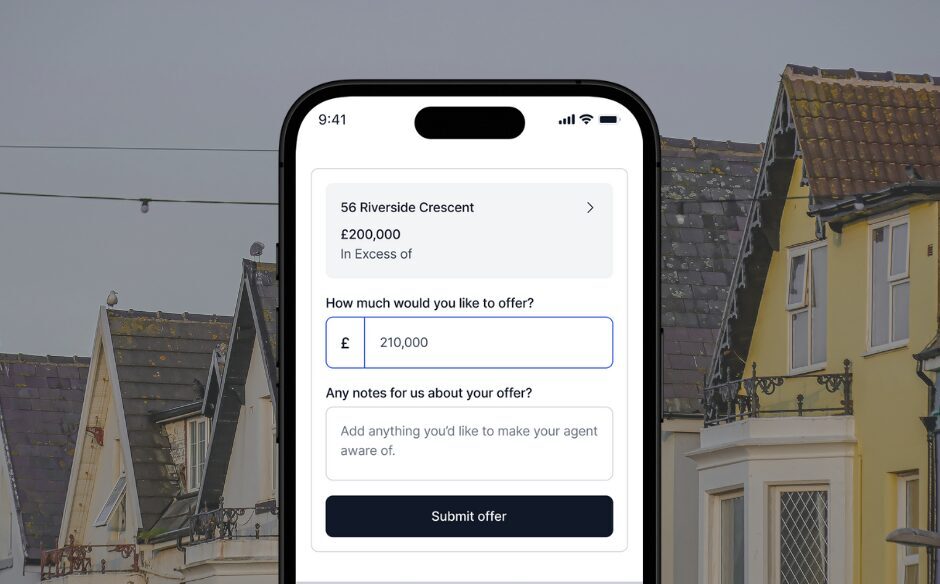
Under the property, you will see the option to “Create Offer” or “Make an Offer”. Please take your time completing this step and double-check the offer you are submitting is correct.
Under “Notes”, please include any conditions related to your offer, such as time frames or items you would like to be included.
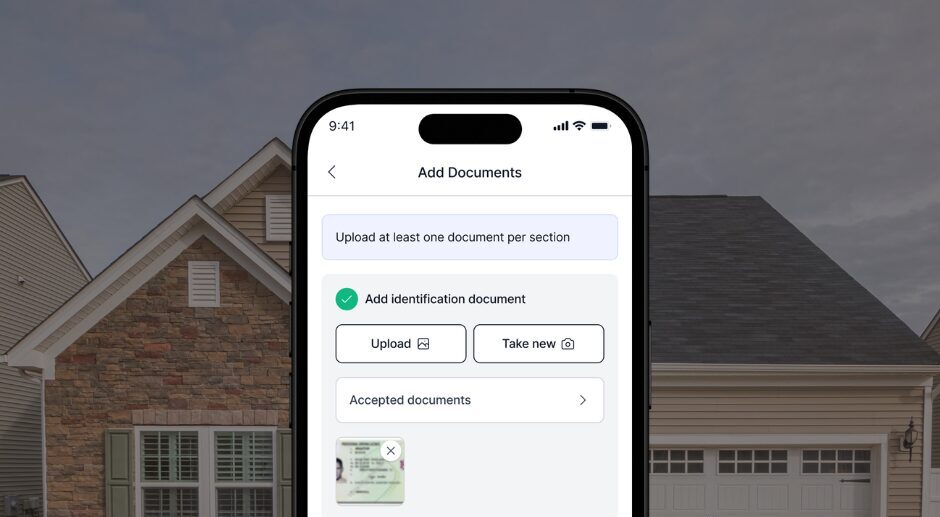
Once you have submitted your offer, please ensure you complete the necessary tasks by returning to the “Overview” section. You will need to complete the “Proof of Funds” task and there may be additional tasks to complete. If not immediately visible, further tasks, such as “Compliance Checks” and “Add Solicitor Details” will appear if your offer is accepted.
If you have not yet instructed a solicitor, we will need these details before the property is marked as “Sold STC” on the market. You can easily receive a quote below from our recommended conveyancers, Jephson Legal.
Found a property you love? Then make an offer and we’ll see if we can get it tied up for you.
I had an excellent experience with Sheldon Bosley Knight throughout the sale of my property.
The team was professional, responsive, and supportive from start to finish. Communication was clear, they kept me informed at every stage, and they were always available to answer questions and provide updates. The sales process was managed efficiently, and I felt confident that everything was being handled properly.
A special thank you to the team for their patience, professionalism, and commitment in helping the sale progress smoothly. Buying and selling a property can be stressful, but their guidance and proactive approach made the experience much easier.
I would happily recommend Sheldon Bosley Knight to anyone looking for a reliable, knowledgeable, and customer-focused estate agent.
I’ve been buying a property being sold by SBK. All the staff have been so friendly and helpful, especially Norma, who’s been absolutely brilliant. Based on my experience I would recommend SBK.
Sheldon Bosley Knight have provided us with the best service, from letting out our commercial unit, managing our tenants, selling our commercial property and recently selling our residential property in a difficult market. I give them 5 stars, and would give more if I could. In summary they go above and beyond, are professional, highly responsive, and deeply knowledgeable. Cannot recommend them enough.
Great job showing me around
Great viewing and communication.
Great viewing and communication.
Great service and friendly agents
Lovely team and Ella was very helpful and kind. I highly recommend!
I recently had the pleasure of working with the team at Sheldon Bosley Knight having relocated from London to Worcester! The communication, transparency and commitment to their clients was apparent throughout the entire process. Josh, Katie and Emma were fantastic. I’d highly recommend Sheldon Bosley Knight to anyone looking to rent or sell/ purchase a property in the Worcester area!
We had an excellent experience with Sheldon Bosley Knight during our property search. Ella was professional, friendly, and incredibly helpful throughout the viewing process. She was well prepared, answered all of our questions clearly, and made the viewing relaxed and informative without any pressure.
Although we ultimately decided to proceed with a different property, we were genuinely impressed with the high level of service we received from Sheldon Bosley Knight. Ella’s communication was excellent, and she made the entire experience smooth and enjoyable.
Thank you to Ella and the team at Sheldon Bosley Knight for your time, professionalism, and support. We would be happy to recommend your services to anyone looking to rent a property.
I thought Andy Gibbs provided exceptional service in helping my daughter find a property that was right for her and also helped her in getting her offer accepted. It’s so important to have the right personality in the job of selling property and Andy’s enthusiasm, knowledge of the market and great communication skills make him perfect for this role!
Thank you for your support and patience throughout the process of purchasing the property. Your service was prompt, professional, and excellent from start to finish. You were always punctual and arranged appointments at times that were convenient for me. I truly appreciate your dedication and would highly recommend your services.
Josh, Katie and Izzy (apols if I've missed anyone) were a pleasure to work with during our application for a rented property in Evesham. Everything went smoothly and the SBK team were always professional, helpful and friendly. Happy to recommend.
Had a really positive experience with Andy Gibbs at SBK when searching for my first flat. Lovely guy and was kind enough to show us around the flat twice within a few days. Answered all our questions, knew his stuff on the properties he was selling and consistently took the time to share updates with me (and my Mum!) throughout the whole process. I wouldn’t hesitate to recommend him to anyone looking to buy or sell a property. Thank you Andy!
On this occasion we were buyers.
But the experience with Sheldon Bosley and Kight has been brilliant. Professional, understanding and accommodating.
I know who to turn to when we come to sell.
A big thank you to all the team.
All the staff that I communicated with were very professional, friendly, very informative, and overall first class. I cannot fault them for a single point 10/10. Thanks guys
Excellent service,very knowledgeable, helpful and friendly.
Fantastic service. I chose Sheldon Bosley Knight over the competition based on a gut feeling after meeting their excellent valuations expert and they did not disappoint. The end-to-end service from valuation through the sales team and on to purchase progress and completion were excellent. The staff were contactable, friendly, professional and went the extra mile for us. I wouldn’t hesitate to recommend. A happy customer.
It was great to work with Wayne. He was instrumental in securing the property. Initially we had gone with our own mortgage advisor and our mortgage application was rejected by the lender and he suggested using another mortgage advisor, who was able to get the mortgage approved by the same vendor and us securing the property. It was a pleasure to deal with Wayne in the Coventry office, he was responsive, quick to sort out bumps and very helpful.
The people at SBK not only were helpful and efficient in handling my purchase, they also gave me several very useful pieces of advice entirely unasked and generally made the process smooth in a way that other involved parties had not done. Were I to sell my house again at some future time, I would certainly choose to market it through these estate agents.
Extremely approachable and helpful. A special shout-out for Josh and Danielle too. Excellent service all round, much appreciated!
Fantastic customer experience delivering brilliant service on every level! Great communication from the initial meeting. I would definitely recommend SBK for buying or selling… I have experienced both! 5*
First class service from the entire Team at SBK, special thanks to Sophie, Andy & Andrew.
We had a fantastic experience with Sheldon Bosley Knight Estate Agency. The communication was spot on from start to finish—we were kept updated every step of the way without any unnecessary delays, which made the whole process much less stressful.
The level of cooperation from the team was amazing. Everyone was professional, helpful, and always willing to answer any questions we had. We truly felt supported throughout the entire process.
We would definitely recommend Sheldon Bosley Knight to anyone looking for a reliable and efficient estate agent, and we wouldn’t hesitate to use their services again in the future. Thank you for making everything run so smoothly!
BRANCH IN EVESHAM
We just want to say that Josh is a credit to the SheldonBosleyKnight team. He was extremely knowledgable, professional and accurate, and according to the Mrs ‘Very Smartly dressed!’. SheldonBosleyKnight have made our house search a Breeze and a Pleasure. Thank you & Great Job to them all. Fingers crossed that all goes smoothly with the sale/exchange which is clearly wouldn’t be due to any fault of this team. Thank you!
Extremely professional service from the team at Sheldon Bosley Knight in Evesham. They sold our house for us in record time, handling all viewings and negotiations and keeping us informed and updated at every stage. We can't recommend them highly enough and thank them for all their help.
SBK have been excellent throughout. Andrew and Andy (even making their names easy) have been super; giving clear guidance, efficient processes and keen attention. Within a week we had photos and floor plan completed and the following week over 10 viewings and an offer within two days. We have been particularly impressed with clear and prompt communications and found the online Street App very easy to use. Everyone at SBK have been friendly and positive and helpful. Thank you
This is my 3rd time using SBK always a fantastic and professional service.
Dealing with the sale of my late fathers house.. Excellent service so friendly and helpful. Got a very quick sale. Would highly recommend and a Big Thank you for what you have done. Jacky
Whilst looking for a property to rent the staff team were so helpful especially Katie, Josh and Issie. They have helped me with any issues I have and were so patient with me as I moved into my new property and can’t thank them enough.
Great customer service
Absolutely brilliant team. Made everything easy and communication was excellent. Highly recommend.
Jess was fantastic from beginning to end. Very friendly and prompt with her replies.
My wife and I went to view a property on Friday and Jasmine showed us around and she was very professional in her job and she answered all the questions we put to her and we would highly recommend sbk letting in coventry. And jasmine put us ease from start to finish.
We would like to thank Sheldon Bosley Knight For all the help My husband and I have received, in selling our property. Jess. and Wayne have been there for us every step of the way. So thank you both. We would definitely recommend Sheldon Bosley Knight. Also we would like to thank the lettings team for all there help. Meredith was extremely helpful. So thankyou you all. Regards Rosemary &Eric
After nearly two years on the market, with a lot of viewings but no serious interest, we placed our property with Sheldon Bosley Knight and had a buyer within a matter of weeks. The property has now sold and completed and we could not be happier.
Everyone is very friendly and helpful. Great experience with house viewings.
The staff at the Coventry office have been very helpful throughout the purchase process thank you all again especially Jess.
The friendliest team who helped to sell our property quickly and hassle free. Confidently recommend.
We’ve had a very positive experience with Sheldon Bosley Knight so far. The process is still ongoing, but communication has been professional, clear, and supportive throughout. Even with some surveyor checks still in progress, the team has kept everything moving smoothly and kept us updated along the way. Thank you for the help and support during the process.
Thumbs up to Isabell and Josh, easy to communicate with and keep it up